

Your nonprofit's fundraising is ahead of schedule, program enrollment is growing, and volunteer participation looks healthy. So why is your organization falling behind on its annual goals? That's the kind of question that can make a nonprofit executive's Monday morning interesting.
The answer may be hiding in plain sight, scattered across fundraising reports, program records, and operational data. Each department has its own numbers, and none of them necessarily tells the whole story. That's where Salesforce dashboards for nonprofits come in, connecting the dots between what individual departments report and how the organization is actually performing.
By bringing fundraising results, program outcomes, volunteer engagement, and other key performance indicators (KPIs) into a centralized view, Salesforce helps nonprofit leaders understand performance without constantly chasing down information. But a useful dashboard doesn't start with charts and graphs. It starts with knowing what questions your organization needs to answer.
What Are Salesforce Dashboards for Nonprofits?
Think of a Salesforce dashboard as your organization's mission control center. Instead of opening a dozen reports to understand what's happening, executives can see important performance indicators in one place. Salesforce dashboards use information from underlying reports and display it through charts, tables, gauges, and other visual components. Depending on how they're configured, users can filter information, refresh results, and examine the reports behind individual metrics.
For a nonprofit executive, that might mean seeing fundraising progress against annual goals alongside program participation, volunteer engagement, and upcoming grant deadlines.
The distinction between Salesforce reports and dashboards is straightforward. Reports organize and summarize information. Dashboards bring selected findings together so leaders can identify patterns, spot potential problems, and understand how different parts of the organization are performing.
Nonprofits using Nonprofit Success Pack (NPSP) or Nonprofit Cloud can build dashboards around their fundraising and operational data, although the available capabilities and underlying data models differ. The opportunity goes beyond putting numbers on a screen. It's about creating a clearer picture of the organization's progress toward its mission.
Five Salesforce Nonprofit KPI Dashboards Worth Building
A food bank, a housing nonprofit, and a youth development organization have different missions. Their dashboards should reflect those differences. Still, most nonprofit executives need visibility into five common areas: fundraising, program outcomes, volunteer engagement, financial sustainability, and overall organizational performance. Here's where nonprofit KPI dashboards can provide the greatest value.
1. Fundraising Dashboards: Look Beyond the Donation Total
Fundraising is an obvious starting point for nonprofit dashboards. After all, knowing whether revenue keeps pace with organizational needs is pretty important. But the amount raised only tells part of the story.
Imagine your annual fundraising dashboard shows donations are up 12%. Great news. But a closer look may reveal declining recurring donor retention, with much of the increase coming from a handful of unusually large gifts. Suddenly, the conversation changes from celebrating revenue growth to understanding whether that growth is sustainable.
A well-designed donor management dashboard can help leaders track fundraising progress, donor retention, recurring gifts, average donation amounts, campaign performance, and major gift opportunities.
For nonprofits using NPSP, Salesforce Opportunities and Campaigns can support donation tracking and fundraising analysis, supplemented by NPSP's nonprofit-specific features. Organizations using Nonprofit Cloud can build comparable reporting around its Fundraising capabilities and associated data model. In either case, the goal is to understand where donations are coming from, which relationships need attention, and what the numbers suggest about future funding.
2. Program Dashboards: Measure Outcomes, Not Just Activities
Nonprofits are generally good at counting what they do: meals served, families assisted, students enrolled, and workshops completed. Those numbers matter, but they don't necessarily tell you whether a program is achieving its intended purpose.
Consider a housing nonprofit that helps families prepare for homeownership. Tracking workshop attendance is useful. But knowing how many participants completed required education, met financial readiness milestones, and ultimately became homeowners tells a much more meaningful story. That's the difference between measuring activity and measuring impact.
Nonprofit impact measurement becomes more valuable when executives can connect services delivered with progress toward intended outcomes. Salesforce can support that connection through appropriately configured program records, participant information, milestones, and reports.
For organizations using Nonprofit Cloud, Program Management and Outcome Management provide dedicated capabilities to track program delivery, define outcomes, establish indicators, and measure progress against goals. Organizations using NPSP can build program reporting through additional applications or custom configurations, although those capabilities aren't automatically included with NPSP.
Of course, not every outcome fits neatly into a monthly chart. Some programs take years to produce meaningful results. Effective dashboards account for those timelines rather than treating every activity as an immediate success. For executives, the important question is whether the organization is making the difference it set out to make.
3. Volunteer Dashboards: Understand Your Capacity to Deliver
Volunteers contribute more than their time. They bring skills, relationships, experience, and community connections that many nonprofits couldn't afford to replace. Some are also donors, making it valuable to understand their involvement across the organization. A useful volunteer dashboard goes beyond sign-ups and hours contributed to reveal participation trends, volunteer retention, training completion, scheduled versus completed shifts, and staffing shortages that could affect program delivery.
For Habitat for Humanity affiliates, tracking volunteer hours is only part of the challenge. Habitat's sweat equity program requires future homeowners to contribute qualifying hours toward homeownership, creating reporting needs that go beyond traditional volunteer management. Affiliates may need to distinguish between construction work, ReStore shifts, educational workshops, and other activities credited toward specific requirements.
DSG has developed a Salesforce solution for a Habitat affiliate that records hours against individual family members, tracks completed and remaining hours, and helps homeowner services staff identify outstanding requirements. The result is a clearer picture of each family's progress and the affiliate's overall program performance.
For nonprofits using the Nonprofit Success Pack (NPSP), Volunteers for Salesforce can support volunteer scheduling, sign-ups, and hour tracking within the same Salesforce environment used to manage donor relationships. Salesforce Flow Builder can automate related tasks, such as updating records, calculating progress against configured requirements, or notifying staff when someone reaches a defined milestone. Nonprofit Cloud also offers Volunteer Management capabilities for organizations using those features.
Together, these tools, alongside appropriately configured dashboards, help nonprofit leaders understand volunteer capacity, recognize overlapping donor and volunteer relationships, and identify where additional support is needed.
4. Financial and Grant Dashboards: See What's Coming, Not Just What's Collected
A nonprofit can meet its fundraising goals and still face serious financial challenges. Maybe a major grant won't be paid until next quarter. Perhaps a significant portion of revenue is restricted to specific programs. Or expenses are increasing faster than anticipated. Without that context, even an impressive fundraising number can create a misleading sense of security.
Financial and grant dashboards help executives understand the relationship between available funding, future commitments, and organizational needs. Depending on the organization's Salesforce configuration, reporting might include grant pipeline status, expected award amounts, reporting deadlines, restricted and unrestricted funding, and anticipated revenue.
Salesforce Opportunities and related records can support grant-seeking pipelines, while additional configuration may be needed to manage award requirements, payment schedules, and reporting obligations. Salesforce's Nonprofit Cloud for Grantmaking supports grant application and award processes for funders and applicants, but organizations should evaluate whether its features match their specific grant management needs.
It's also important to recognize that Salesforce isn't automatically an accounting system. Accurate expense reporting, cash balances, and budget comparisons may depend on integrations with financial software. A financial dashboard should reflect how the organization actually manages its money, including which systems provide the authoritative information.
5. Executive Dashboards: Connect Performance Across Departments
Departmental dashboards help teams manage their responsibilities. Executive dashboards should help leaders see how those responsibilities fit together. An executive director doesn't need every fundraising transaction, volunteer assignment, or program record displayed on one screen. They need to know whether the organization is on track, where risks are emerging, and what requires their attention.
Imagine a dashboard showing that a housing nonprofit is meeting its fundraising targets but falling behind on homeownership milestones. A closer look reveals that volunteer availability has declined, delaying construction schedules and affecting program commitments. Those issues may seem unrelated in separate departmental reports, but together they reveal an operational problem leadership can address.
That's the value of connecting nonprofit performance metrics across the organization. A focused executive dashboard provides a high-level picture while allowing users to examine the underlying reports when something needs attention. The objective isn't to squeeze the entire organization onto one screen. It's to make the relationships between performance, resources, and mission delivery easier to understand.
What a Salesforce Executive Dashboard Looks Like in Practice
Imagine the executive director of a regional housing nonprofit opening Salesforce to review a dashboard built around the organization's leadership priorities. Here's what that dashboard might show:
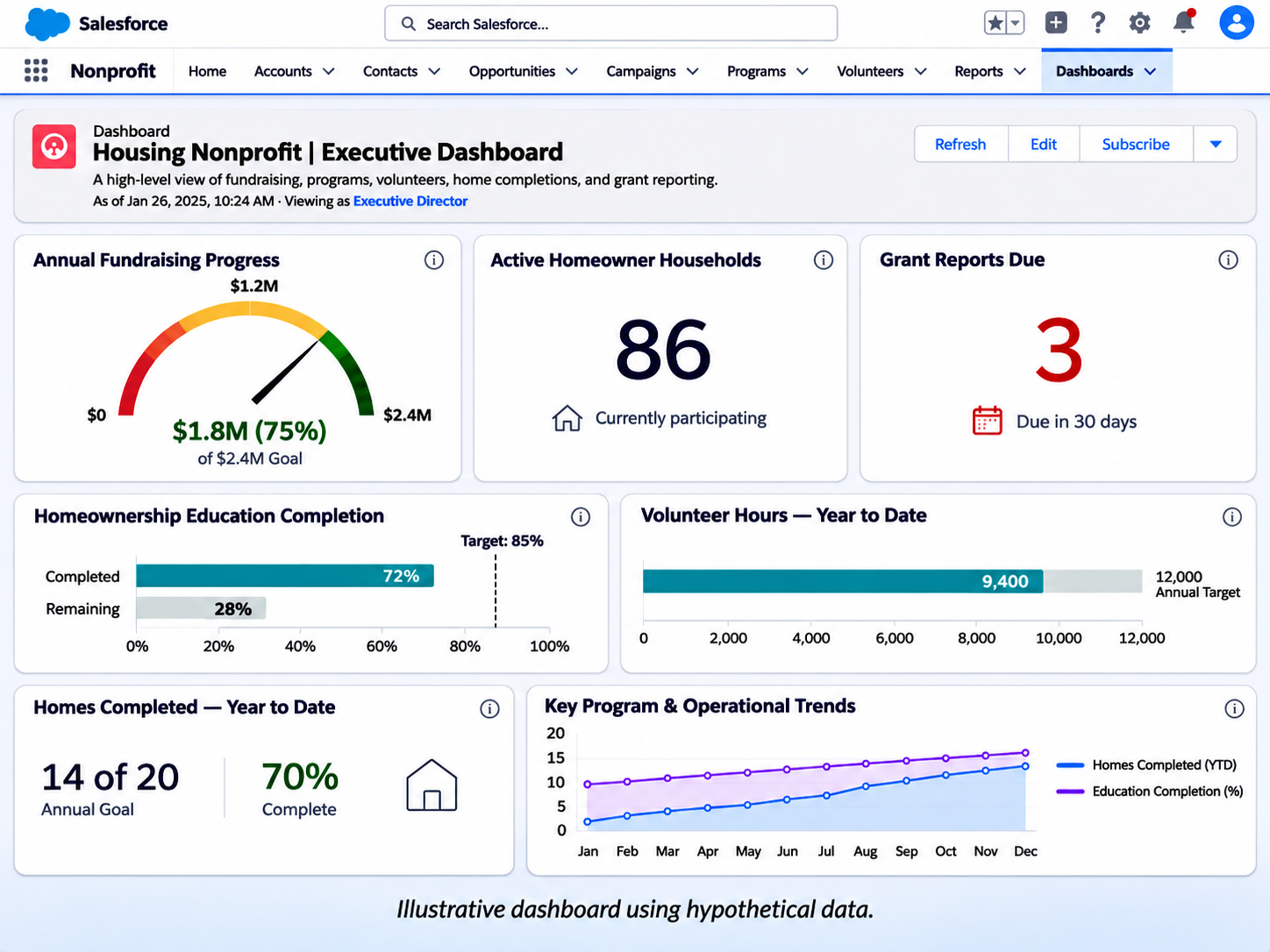
At first glance, fundraising looks relatively healthy. But education completion is lagging, volunteer hours and home completions warrant a closer look against the year's timeline, and several grant reports are approaching their deadlines.
By the next board meeting, the conversation can focus on next steps. Producing this dashboard would require the appropriate Salesforce records, reporting definitions, calculations, and potentially custom configuration or integrations. But the example shows what thoughtful nonprofit data visualization can accomplish when information from different departments comes together.
Which Salesforce Tools Support Nonprofit Reporting and Dashboards?
One of Salesforce's strengths is that organizations can start with relatively straightforward reporting and expand their capabilities as their needs evolve. Salesforce Reports and Dashboards provide the foundation. Reports organize information through filters, groupings, and summaries, while dashboards present selected results visually. Custom Report Types can support reporting across related Salesforce objects when standard report types don't meet an organization's needs.
Dynamic Dashboards provide individualized views based on each user's Salesforce access permissions, allowing staff to see relevant information without creating separate dashboards for everyone. However, availability and limits depend on the Salesforce edition, and Dynamic Dashboards must be refreshed manually rather than through scheduled dashboard refreshes.
Flow Builder supports reporting indirectly by automating processes that keep records updated. For example, a nonprofit might use a record-triggered flow to update a program status or alert staff when a grant milestone is approaching.
For more advanced analysis, CRM Analytics provides capabilities beyond standard dashboards, including more sophisticated data exploration and visualization. It's a separately licensed product, so organizations should evaluate whether those capabilities justify the additional investment.
The important thing is matching the tools to the organization's actual needs. A small nonprofit may find that standard Salesforce reports and dashboards provide everything its leadership team requires. A larger organization managing complex programs, multiple funding sources, and external data systems may benefit from additional analytics capabilities. Sometimes the smartest solution is a carefully configured standard dashboard, not another product or layer of customization.
How to Build Salesforce Dashboards Nonprofit Executives Actually Trust and Use
It's entirely possible to build a beautiful Salesforce dashboard that nobody trusts or uses.
Sometimes the problem is information overload. A dashboard contains so many charts, percentages, and tables that executives struggle to identify what deserves attention. Other times, the problem lies beneath the surface.
Donor records may be duplicated. Program data may be incomplete. Staff might use different definitions for the same metric. Or critical information may still live in disconnected spreadsheets and systems that don't feed into Salesforce. As we've explored in our discussion of the hidden costs of nonprofit spreadsheets, those gaps can create problems long before anyone builds a dashboard.
When that happens, the dashboard becomes a polished presentation of unreliable information.
At Dynamic Specialties Group (DSG), we approach dashboard development as part of a larger CRM strategy, not an isolated technology project.

Plan First. Build Smart.
That starts with understanding who will use the dashboard and what decisions they need to make. An executive director needs a different view than a development officer. A program manager may need detailed participant records, while a board member may only need high-level indicators and trends. Rather than trying to accommodate everyone on one dashboard, identify the questions each audience needs answered.
What does the executive director need to know every Monday? Which metrics help the development team prioritize donor outreach? What information would allow program managers to identify participants who need additional support?
From there, determine whether the necessary data exists, how to organize it, and who is responsible for maintaining it. Consistent data entry practices, clearly defined KPIs, and appropriate access controls are essential. Salesforce Permission Sets, sharing rules, and dashboard running-user settings help organizations manage sensitive information. However, a standard dashboard can display data based on its designated running user's permissions, while a Dynamic Dashboard reflects the individual viewer's access. These settings deserve careful review before dashboards are shared broadly.
Timeliness matters, too. Standard Salesforce dashboards display information from their most recent refresh, while connected systems may update on different schedules. Leaders should understand how current the underlying information is before relying on it.
At DSG, we start with the business requirements and work backward to the technology. That means using standard Salesforce functionality where it makes sense, configuring the platform to support established processes, and introducing custom development only when the requirements justify it.
For dashboards, we favor starting with a manageable number of meaningful KPIs, validating the data, and refining the reporting based on how people actually use it. And because nonprofits evolve, dashboards should evolve with them. New programs, funding requirements, and organizational priorities may call for different metrics or reporting approaches. In short, a dashboard shouldn't become another system people maintain simply because it's always been there. It should earn its place by helping them do their jobs.
Better Salesforce Dashboards Lead to Better Nonprofit Decisions
For nonprofit executives, the challenge usually isn't a lack of information. It's turning that information into something useful before the next decision needs to be made. That's where Salesforce dashboards for nonprofits can deliver meaningful value. They help leaders understand fundraising trends, evaluate program performance, monitor operational capacity, and identify emerging challenges without constantly assembling information from disconnected sources.
More importantly, they can change the nature of leadership conversations. Instead of spending a board meeting debating whose spreadsheet is correct, leaders can discuss why a program is falling behind, whether to redirect resources, or how to build on an initiative that's producing measurable results.
Of course, dashboards don't make those decisions. People do. We help nonprofits look beyond the dashboard itself to understand the systems, processes, and reporting requirements that support it. Whether that means improving an existing Salesforce environment or building new capabilities, our focus is on practical solutions that serve the organization's mission. Because the goal isn't to create more charts, it's to give nonprofit leaders the clarity and confidence to act on what matters.
Ready to see the bigger picture? Dynamic Specialties Group can help your nonprofit turn disconnected data into Salesforce dashboards that reveal what's working, where attention is needed, and how to make more informed decisions. Let's talk about building reporting that works for your mission.






SHARE